One MCP server for all your Google accounts.
Claude reads every inbox you have and drafts from the right address, finds and reads files in every Drive, writes Docs and Sheets, and manages every calendar. It never sends and never deletes. Open source, and it runs on your machine.
What you ask
What came in today across my inboxes?
Summarise the thread with the venue about Thursday and draft a reply from my work address.
Find the budget sheet in any of my Drives and tell me what changed this month.
Read the client deck and the meeting notes, then write a one-page brief as a new Doc.
Who have I been waiting on for more than three days?
Archive the newsletters and label the client emails.
You see the plan first.Block Thursday 2 to 4 pm for deep work on my work calendar.
A morning with /mail-triage
One command in Claude Code. It reads what is new in every account, finds the replies you owe and the answers you are waiting for, and leaves drafts in each account, written the way you write.
How it works
Tools
| Tool | Does |
|---|---|
| search_mail | Gmail search syntax, across every account or one |
| read_thread | A whole thread as plain text, with attachment names |
| create_draft | A reply in the thread, or a new email, saved as a draft in the chosen account |
| label_threads | Apply or remove labels; missing labels are created |
| archive_threads | Out of the inbox, still in All Mail, back on any reply |
| mark_read | Read or unread |
| list_events | Every calendar of every account, duplicates merged |
| create_event, update_event | Add or change events, with a Meet link if you want one |
| search_files | Names and contents across every Drive, shared drives included |
| read_file | Docs as Markdown, Sheets tab by tab, Slides with notes, PDFs and images |
| create_doc, edit_doc | A new Doc from Markdown; append or find-and-replace |
| create_sheet, update_sheet | A new Sheet from rows, formulas included; append or overwrite |
| list_accounts, list_labels | What is connected, and each account's labels |
Safety, by design
- No send, no delete. Those tools do not exist. Every email leaves from your own Gmail, after you have read it. No file, event or message can be deleted.
- Shared files and guests wait for you. Editing a Doc or Sheet other people can see, or an event with guests, is refused until you approve that exact change. The check is in the code.
- Mail sorting is reversible. Archived mail stays in All Mail and returns on a reply. Labels come off. Sorting asks first until you tell it not to.
- Your key, your machine. You create your own Google login key. Tokens stay in
~/.config/multi-google-mcp, readable by your user only. No third party ever sees your data.
Setup
Node.js 20 or newer, a Google account, and Claude Code (Claude Desktop and Cursor work too). About 15 minutes, once. The wizard waits for you at every step.
Your own Google login key
Each user makes their own key, so your data never goes through anyone else. These are the six screens you will see.
Create a project
Open New Project, name it
multi-google-mcp, click Create, then Select project in the notification.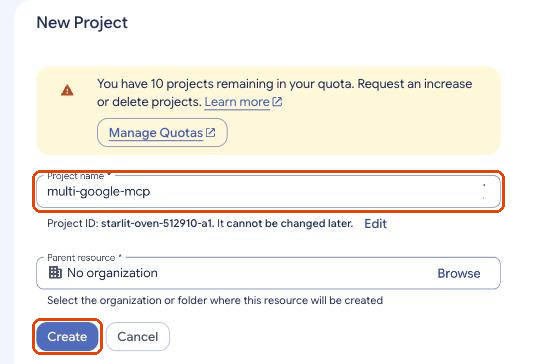
Turn on the six APIs, with one link
Open this link, check the top bar shows your project, then Next and Enable.
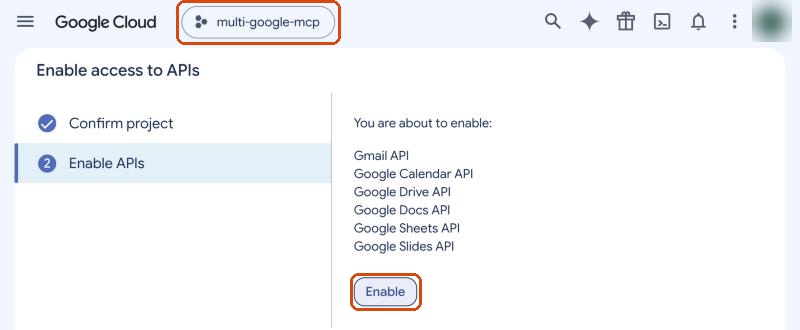
Set up the sign-in screen
Open Google Auth Platform and click Get started. Any app name without "Google", "Gmail" or "Inbox". Audience: External. Tick the policy box, Continue, Create.
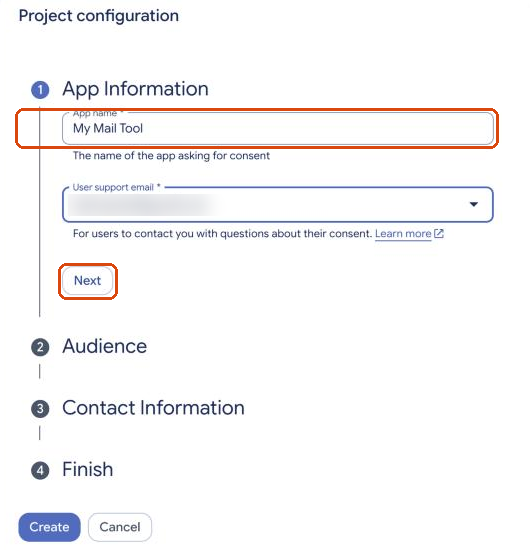
Add the two links Google requires
Open Branding and fill in, then Save: home page
https://multi-google-mcp-tau.vercel.app, privacy policyhttps://multi-google-mcp-tau.vercel.app/privacy, authorized domainmulti-google-mcp-tau.vercel.app.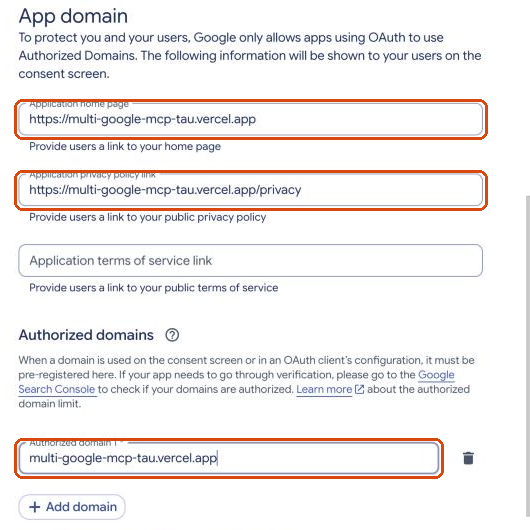
Publish the app
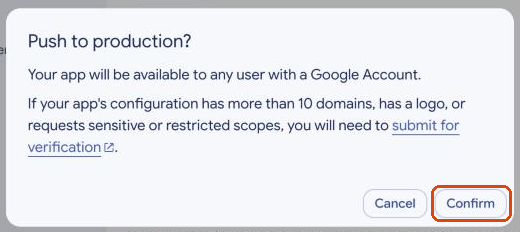
Open Audience, click Publish app, then Confirm. Ignore the note about verification: the app is only for you. Without publishing, Google signs you out every 7 days.
Create the login key
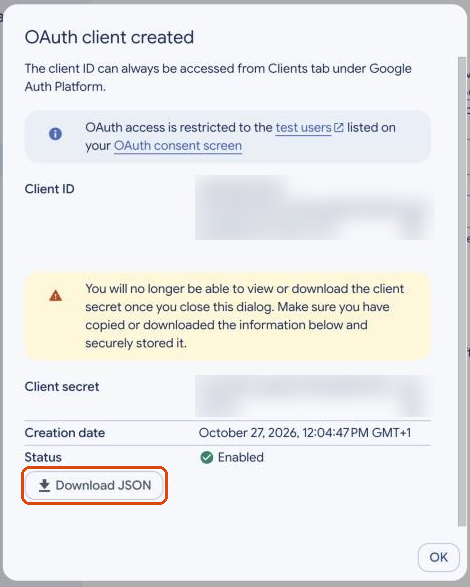
Open Create client, choose Desktop app, click Create, then Download JSON. Google shows the secret only once. The wizard finds the file by itself.
Your accounts
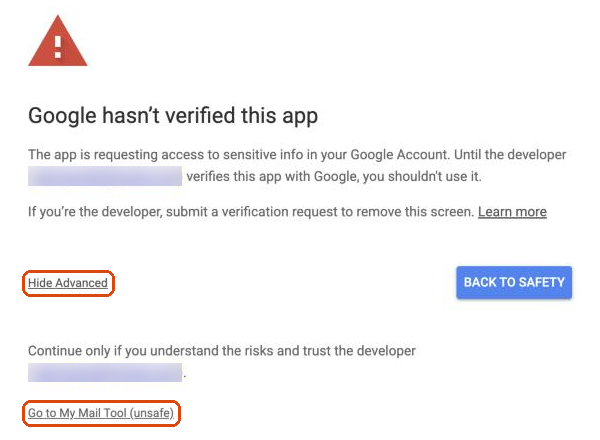
Type each address and a browser tab opens. Google warns that it has not verified the app: it is your own app, so click Advanced, then Go to (your app name), and tick every box. The wizard then checks Gmail, Drive and Calendar on each account.
Claude
Setup registers the server in Claude Code for all your projects and installs the /mail-triage skill. Open a new session and ask what came in today.
Questions
Why do I need my own Google project?
Reading Gmail and Drive are restricted permissions. An app that many people share needs a paid, yearly security audit from Google. A private app used only by you does not, and your data never touches anyone else's server.
Google says "Access blocked: admin_policy_enforced".
That organisation's Google admin blocks outside apps. Only the admin can allow it. Your other accounts still work.
Why does the consent screen ask for so much?
Archiving needs Gmail's "modify" permission and reading every file needs full Drive access, and Google describes both broadly, including sending and deleting. The server exposes no send or delete tool, and the code is open for you to check.
Can it read Word, Excel or PowerPoint files?
Not yet. It reads Google Docs, Sheets and Slides, text files, PDFs and images. Save an Office file as a Google file in Drive first.
Does it work with Outlook or iCloud?
No. Google accounts only.
How is it different from other Google MCP servers?
Most connect one account. This one runs several at once: every search covers every account, results are merged, drafts and files land in the account you choose, and the guardrails for shared files and guests are in the code.